ClickUp Alternatives 2026: 7 Best Tools Compared

- Why Look for ClickUp Alternatives?
- Quick Comparison Table
- 1. Asana: Best for Simplicity
- 2. Monday.com: Best for Visual Workflows
- 3. Notion: Best for Docs + PM
- 4. Trello: Best for Simple Kanban
- 5. Jira: Best for Software Teams
- 6. Basecamp: Best for Flat Pricing
- 7. Airtable: Best for Database + PM
- Which Should You Choose?
- Migration Tips
- FAQs
Quick Verdict: Which ClickUp Alternative Is Right for You?
Choose Asana if ease of use is your top priority and you have budget flexibility for premium features.
Choose Monday.com if you need visual, color-coded boards with moderate complexity for marketing or creative teams.
Choose Notion if documentation and knowledge management matter more than heavy project management.
Choose Trello if you only need basic Kanban boards with maximum simplicity.
ClickUp has become one of the most popular project management platforms, offering an impressive suite of features and deep customization options. The company’s tagline “One app to replace them all” resonates with teams tired of juggling multiple tools. However, this all-in-one approach comes with trade-offs that don’t work for everyone.
Many teams discover that ClickUp offers powerful features but with a steep learning curve that slows adoption. Others find the interface cluttered or experience performance issues with large workspaces. Some simply need specialized tools focused on specific use cases rather than a Swiss Army knife approach.
This comparison evaluates seven leading alternatives based on real-world testing with marketing workflows, development projects, and creative team collaboration. We’ve analyzed each tool’s pricing structure, ease of use, feature depth, integration ecosystem, and ideal use cases to help you make an informed decision.
How We Evaluated Each Alternative
Our evaluation process involved hands-on testing of each platform over multiple weeks, focusing on these criteria:
- Ease of Use: How quickly can new team members become productive?
- Features & Flexibility: Does it handle complex workflows or specialize in specific use cases?
- Pricing Value: What do you get at each price tier compared to ClickUp?
- Integration Ecosystem: How well does it connect with your existing tools?
- 2026-Relevant Capabilities: AI features, automation, remote collaboration tools
- Performance & Reliability: Speed, uptime, mobile experience
Why Look for ClickUp Alternatives?
Common Reasons to Switch
- Too Complex: ClickUp’s extensive feature set can overwhelm teams with simple project management needs. The platform offers hundreds of features and customization options that many teams never use.
- Steep Learning Curve: New users often face weeks of training before becoming proficient. Team members accustomed to simpler tools may resist adoption. Learn more about how difficult ClickUp is to learn.
- Performance Issues: Large workspaces with thousands of tasks can experience slow loading times and lag, especially on the mobile app.
- Different Priorities: Some teams need specialized tools for documentation (Notion), development (Jira), or visual collaboration (Monday.com) rather than general-purpose project management.
- Budget Constraints: While ClickUp offers competitive pricing, alternatives like Basecamp provide flat-rate pricing that saves money for larger teams.
- Mobile Experience: ClickUp’s mobile app, while improved, still lacks some desktop features and can feel cluttered on smaller screens.
ClickUp excels at customization and delivers exceptional value, but sometimes “simple and focused” beats “powerful and complex” for specific team needs and workflows.
Quick Comparison Table
| Tool | Best For | Starting Price | Ease of Use | Key Strength | Rating |
|---|---|---|---|---|---|
| Asana | Simple, visual workflows | $10.99/user/mo | ⭐⭐⭐⭐⭐ 5/5 | Beautiful UI ???? Easiest | 4.3/5 |
| Monday.com | Visual project boards | $9/user/mo | ⭐⭐⭐⭐ 4/5 | Colorful customization | 4.2/5 |
| Notion | Docs + lightweight PM | $8/user/mo | ⭐⭐⭐⭐ 4/5 | All-in-one workspace ???? Best Docs | 4.4/5 |
| Trello | Simple Kanban boards | Free (paid $5/user) | ⭐⭐⭐⭐⭐ 5/5 | Simplicity ???? Best Value | 4.0/5 |
| Jira | Software development | $7.75/user/mo | ⭐⭐⭐ 3/5 | Agile/Scrum tools ???? Dev Teams | 4.1/5 |
| Basecamp | Team communication | $15/user/mo flat | ⭐⭐⭐⭐ 4/5 | Flat pricing ???? Large Teams | 3.9/5 |
| Airtable | Database + PM hybrid | $10/user/mo | ⭐⭐⭐½ 3.5/5 | Spreadsheet flexibility | 4.3/5 |
#1 – Asana: Best for Simplicity and Beautiful Design
Overview
Founded in 2008 by Facebook co-founder Dustin Moskovitz, Asana has refined its approach to project management by focusing relentlessly on user experience. The platform feels polished and intuitive from the first login, making it ideal for teams that value quick adoption over extensive customization options.
Key Features
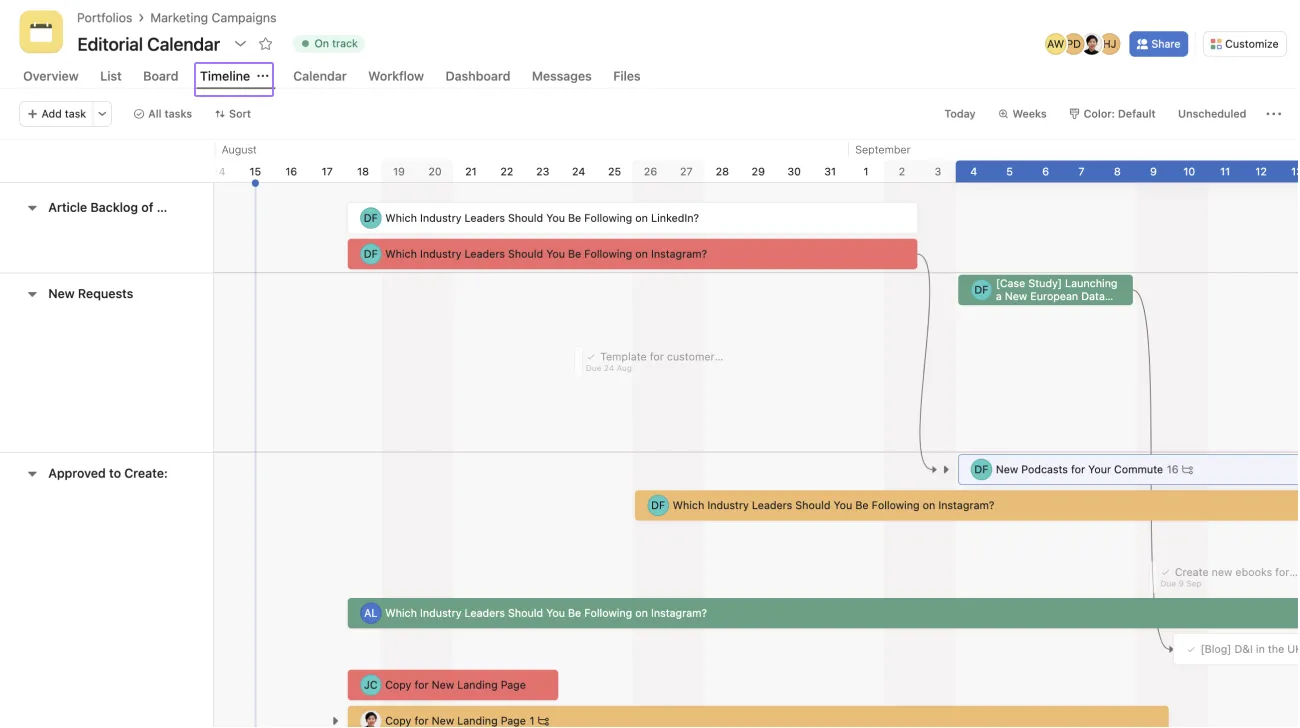
- Timeline View: Industry-leading Gantt chart visualization with drag-and-drop dependency management
- Portfolio Management: Track multiple projects simultaneously with rollup reporting
- Workflow Builder: Automate repetitive processes with conditional logic and custom triggers
- Forms: Collect intake requests from stakeholders with custom fields
- Reporting: Built-in analytics for project progress, workload, and team capacity
- Goals: Connect daily work to company objectives with cascading goal hierarchies
Pricing
- Basic (Free): Up to 10 users, unlimited tasks, basic workflows
- Premium ($10.99/user/month): Timeline view, advanced search, workflow builder, custom fields
- Business ($24.99/user/month): Portfolios, workload management, advanced integrations, proofing
- Enterprise (Custom pricing): Advanced security, admin controls, premium support
Asana vs ClickUp
When to choose Asana:
- Your team prioritizes ease of use over deep customization
- You need rapid adoption with minimal training (within 1 week)
- Beautiful, polished design matters to team morale and engagement
- You manage straightforward marketing, creative, or operations projects
- Budget allows for premium pricing in exchange for superior UX
When to stick with ClickUp:
- You need extensive customization and multiple view types (15+ views in ClickUp)
- Budget is tight (ClickUp costs 30-40% less for comparable features)
- You want unlimited free users on the free plan
- Advanced automation and custom fields are critical from day one
For a detailed head-to-head analysis, see our complete ClickUp vs Asana comparison for marketing teams.
✅ Asana Pros
- Incredibly intuitive interface with minimal learning curve
- Fast team adoption (most teams productive within 3-5 days)
- Excellent timeline and Gantt chart visualization
- Beautiful, responsive mobile app with offline mode
- Strong enterprise support and security features
- Powerful portfolio management for tracking multiple projects
❌ Asana Cons
- Expensive for advanced features (Business plan at $24.99/user)
- Limited customization compared to ClickUp’s flexibility
- Automation requires paid Premium plan ($10.99/user minimum)
- Fewer third-party integrations (200+ vs ClickUp’s 1,000+)
- No built-in time tracking (requires third-party integration)
- Free plan limited to 10 users only
#2 – Monday.com: Best for Visual Workflow Boards
Overview
Monday.com built its reputation on highly visual, color-coded boards that make project status obvious at a glance. The platform excels for creative and marketing teams who think visually and need to communicate project status to stakeholders who won’t dive into complex project management tools.
Key Features
- Visual Boards: Signature color-coded status columns with customizable labels
- Multiple Views: Kanban, timeline, calendar, Gantt, map, and workload views
- Automations: 250+ pre-built automation recipes plus custom automation builder
- Dashboards: Combine widgets for visual project insights and KPI tracking
- Forms & Docs: Built-in documentation and intake forms
- Integrations: Connect with 200+ tools including Slack, Gmail, and Zoom
Pricing
- Free: Up to 2 users, very limited features (3 boards only)
- Basic ($9/user/month): Unlimited boards, 5GB storage, iOS/Android apps
- Standard ($12/user/month): Timeline, Gantt, calendar views, 250 automation actions/month
- Pro ($19/user/month): Time tracking, formula columns, 25,000 automation actions
- Enterprise (Custom): Advanced security, analytics, multi-level permissions
Monday.com vs ClickUp
When to choose Monday.com:
- You need visual, color-coded project boards for instant status recognition
- Marketing, creative, or event planning teams benefit from visual collaboration
- You want easier initial setup than ClickUp but more features than Asana
- Video collaboration matters (built-in screen recording and feedback)
- You prefer polished UX over maximum feature density
When to stick with ClickUp:
- You need better value (Monday.com costs 30-50% more for similar features)
- You want more generous free and lower-tier plans
- You need unlimited free users (ClickUp offers this, Monday.com doesn’t)
- Advanced custom fields and views are essential
See our detailed ClickUp vs Monday.com comparison for marketing agencies.
✅ Monday.com Pros
- Gorgeous, intuitive visual boards with color-coding
- Great for non-technical teams and visual thinkers
- Strong automation capabilities (250+ recipes on Standard plan)
- Excellent customer support with dedicated success managers
- Built-in time tracking and workload management
- Beautiful mobile apps for iOS and Android
❌ Monday.com Cons
- Expensive (30-50% more than ClickUp for similar functionality)
- Very limited free plan (only 2 users, 3 boards)
- Interface can feel cluttered with many custom columns
- Performance degrades with 500+ tasks per board
- Learning curve for advanced features (formulas, complex automations)
- Limited offline functionality
#3 – Notion: Best for Docs + Lightweight Project Management
Overview
Notion has revolutionized how teams organize information by blending documents, databases, and tasks into a unified workspace. Its minimalist design and powerful database functionality make it ideal for content teams, startups, and remote organizations that need a central knowledge hub more than complex project management tools.
Key Features
- Databases: Flexible, relational databases with multiple views (table, board, gallery, calendar)
- Wikis & Docs: Beautiful collaborative documentation with nested pages
- Templates: Access to 10,000+ community templates for every use case
- Notion AI: Built-in AI assistant for writing, summarization, and content generation
- Lightweight Tasks: Basic Kanban and calendar views for simple project tracking
- Integrations: Connect with Slack, Google Drive, GitHub, and 50+ apps
Pricing
- Free: Unlimited pages and blocks for individuals
- Plus ($8/user/month): Unlimited file uploads, 30-day version history
- Business ($15/user/month): Advanced permissions, analytics, bulk export
- Enterprise (Custom): SAML SSO, advanced security, dedicated support
Notion vs ClickUp
When to choose Notion:
- Documentation and knowledge management are your top priorities
- You want beautiful, highly customizable workspaces
- Your team needs lightweight project management only
- You prefer minimalist, distraction-free design over feature density
- Content creation, wikis, or product documentation are core workflows
When to stick with ClickUp:
- You need robust project management (Gantt charts, dependencies, critical path)
- Multiple task views beyond Kanban/calendar are essential
- Built-in time tracking and advanced automation are critical
- Your team manages complex, multi-phase projects with dependencies
Read our comprehensive ClickUp vs Notion comparison for content creators.
✅ Notion Pros
- Best-in-class documentation and knowledge management
- Beautiful, minimalist design with extensive customization
- Powerful relational database functionality
- Affordable pricing ($8/user vs ClickUp’s $7/user for similar features)
- Massive template library (10,000+ community templates)
- Excellent for remote teams and async collaboration
❌ Notion Cons
- Weak project management features (no Gantt, limited dependencies)
- No native time tracking functionality
- No advanced timeline or resource management
- Limited automation compared to ClickUp or Monday.com
- Can be slow with very large databases (1,000+ items)
- Steeper learning curve for database concepts
#4 – Trello: Best for Simple Kanban Workflows
Overview
Acquired by Atlassian in 2017, Trello pioneered the visual Kanban approach to task management. The platform’s simplicity is its superpower—you can start organizing work within minutes of signing up. Trello works exceptionally well for editorial calendars, personal task management, and small team collaboration where complex features would create unnecessary overhead.
Key Features
- Kanban Boards: Intuitive drag-and-drop cards across customizable lists
- Power-Ups: Add-ons for extended functionality (calendar, voting, integrations)
- Butler Automation: Basic automation rules for repetitive tasks
- Calendar View: See tasks organized by due date
- Templates: Pre-built workflow boards for common use cases
- Mobile Apps: Excellent iOS and Android apps with offline mode
Pricing
- Free: Unlimited cards, 10MB file attachments, 10 boards per workspace
- Standard ($5/user/month): Unlimited boards, advanced checklists, custom fields
- Premium ($10/user/month): Calendar view, unlimited Power-Ups, advanced automation
- Enterprise ($17.50/user/month): Admin controls, organization-wide boards, public board management
Trello vs ClickUp
When to choose Trello:
- You only need simple Kanban board functionality
- Team has zero patience for learning curves or complex tools
- Managing straightforward workflows (editorial calendar, personal tasks, simple projects)
- You’re on an extremely tight budget (generous free plan)
- Simplicity and speed outweigh advanced features
When to stick with ClickUp:
- You need Gantt charts, timelines, or multiple view types
- Automation beyond basic rules is critical to your workflow
- You manage complex, multi-phase projects with dependencies
- Built-in time tracking is required
- You need advanced reporting and analytics
✅ Trello Pros
- Incredibly simple to learn (productive in 15 minutes)
- Generous free plan with unlimited users and cards
- Perfect for personal use, freelancers, or very small teams
- Fast and lightweight performance
- Owned by Atlassian (reliable, well-supported)
- Excellent mobile apps with offline functionality
❌ Trello Cons
- Too basic for complex projects or large teams
- Limited reporting and analytics capabilities
- No built-in time tracking (requires Power-Up)
- Weak automation (Butler is very basic)
- No Gantt charts, timeline views, or resource management
- Power-Ups can add up in cost quickly
#5 – Jira: Best for Software Development Teams
Overview
Atlassian’s Jira has dominated software development project management for over two decades. The platform is purpose-built for engineering teams, offering deep functionality for bug tracking, sprint planning, release management, and agile ceremonies. While it has a steep learning curve, development teams already immersed in agile practices will find Jira’s specialized features invaluable.
Key Features
- Scrum & Kanban Boards: Optimized boards for agile workflows with sprint planning
- Sprint Planning: Velocity tracking, burndown charts, sprint retrospectives
- Issue Tracking: Sophisticated bug tracking and resolution workflows
- Roadmaps: Long-term project planning with dependency visualization
- DevOps Integrations: Deep integration with Bitbucket, GitHub, Jenkins, CI/CD pipelines
- Advanced Reporting: Custom JQL queries, velocity charts, cumulative flow diagrams
Pricing
- Free: Up to 10 users, 2GB storage, community support
- Standard ($7.75/user/month): 250GB storage, advanced permissions, audit logs
- Premium ($15.25/user/month): Advanced roadmaps, unlimited storage, 24/7 support
- Enterprise (Custom): Unlimited sites, advanced security, enterprise support
Jira vs ClickUp
When to choose Jira:
- Your team builds software using Scrum, Kanban, or other agile methodologies
- Bug tracking and issue management are core workflows
- You need deep DevOps tool integrations (Bitbucket, Jenkins, etc.)
- You’re already in the Atlassian ecosystem (Confluence, Bitbucket)
- Advanced sprint planning and velocity tracking are critical
When to stick with ClickUp:
- Your team isn’t purely developers (mixed marketing, operations, engineering)
- You want a more intuitive interface for non-technical users
- You need broader use case flexibility beyond software development
- Simpler pricing structure is preferred
✅ Jira Pros
- Industry standard for agile software development
- Powerful issue tracking and bug management
- Excellent DevOps and CI/CD integrations
- Scalable for large enterprise development teams
- Strong sprint planning and agile reporting tools
- Integrates seamlessly with Atlassian suite
❌ Jira Cons
- Steep learning curve (steeper than ClickUp)
- Overwhelming interface for non-developers
- Expensive for advanced features (Premium at $15.25/user)
- Not suitable for general project management
- Requires Confluence for proper documentation
- Performance issues with very large projects
#6 – Basecamp: Best for Flat Pricing & Simplicity
Overview
Basecamp pioneered web-based project management in 2004 and has maintained a philosophy of simplicity ever since. The platform focuses on team communication, file sharing, and basic task management rather than competing on feature count. For large teams wanting predictable costs and straightforward tools, Basecamp’s approach is refreshing.
Key Features
- Message Boards: Threaded team discussions organized by topic
- To-Do Lists: Simple task management with assignments and due dates
- Schedules: Shared team calendars for milestones and events
- Docs & Files: Centralized file storage and document management
- Hill Charts: Unique progress visualization showing work momentum
- Check-ins: Automated team status updates and questions
Pricing
- Basecamp (Free): 3 projects, 1GB storage, 20 users maximum
- Basecamp Pro Unlimited ($299/month flat): Unlimited users, projects, storage
Basecamp vs ClickUp
When to choose Basecamp:
- You have a large team (20+ people) where flat pricing saves money
- Simplicity and communication outweigh complex task management
- Team communication is a higher priority than project complexity
- You want completely predictable monthly costs
- Your agency or consulting firm bills clients and needs client access
When to stick with ClickUp:
- Your team is small (under 15 people) where per-user pricing is cheaper
- You need advanced project management (Gantt charts, dependencies, automation)
- Customization and flexibility are important
- You want multiple task views and reporting capabilities
✅ Basecamp Pros
- Flat pricing is amazing for large teams (breaks even at ~20 users)
- Extremely simple, clean interface
- Strong team communication and collaboration tools
- No per-user limits or surprise costs
- Excellent customer support (legendary service quality)
- Great for client collaboration and communication
❌ Basecamp Cons
- Very basic project management capabilities
- No Gantt charts, timelines, or dependencies
- Minimal third-party integrations
- No automation whatsoever
- Limited customization options
- Expensive for small teams (under 15 users)
#7 – Airtable: Best for Database + Project Management Hybrid
Overview
Airtable reimagines spreadsheets as powerful databases with relational capabilities, multiple views, and rich media support. The platform appeals to teams comfortable with spreadsheet thinking who need the structure of a database and the flexibility to view data in multiple formats (grid, Kanban, calendar, gallery).
Key Features
- Relational Databases: Link records across tables for complex data relationships
- Multiple Views: Grid, Kanban, calendar, gallery, Gantt, and form views
- Automations: Workflow automation builder with conditional logic
- Forms: Custom data collection forms with conditional fields
- Extensions: Add-ons for charts, scripts, and specialized functionality
- API: Robust API for custom integrations and automation
Pricing
- Free: Unlimited bases, 1,200 records per base, 2GB attachments
- Plus ($10/user/month): 5,000 records per base, 5GB attachments per base
- Pro ($20/user/month): 50,000 records, advanced features, priority support
- Enterprise (Custom): Unlimited records, advanced security, dedicated support
Airtable vs ClickUp
When to choose Airtable:
- You need powerful relational database capabilities
- Content calendars, product catalogs, or inventory management are core use cases
- Spreadsheet familiarity is preferred over traditional PM interfaces
- You want data-first project management with flexible views
- Custom workflows require unique data structures
When to stick with ClickUp:
- You need traditional project management tools (Gantt, time tracking)
- Your team isn’t comfortable with spreadsheet/database concepts
- You want better task dependency management
- Pricing matters (Airtable is 40-50% more expensive)
✅ Airtable Pros
- Powerful relational database with flexible data modeling
- Spreadsheet familiarity lowers learning curve
- Beautiful gallery, Kanban, and calendar views
- Excellent API for custom integrations
- Great for content management and product catalogs
- Rich media support (images, videos, attachments)
❌ Airtable Cons
- Expensive for advanced features (Pro at $20/user)
- Learning curve for database and relational concepts
- Not ideal for traditional project management workflows
- Record limits on lower-tier plans (1,200 on free, 5,000 on Plus)
- Can become complex quickly with many linked tables
- Limited native time tracking and resource management
Which ClickUp Alternative Should You Choose?
Choose Asana if:
- Ease of use is your #1 priority
- You have budget flexibility for premium UX
- Quick team adoption matters (within 1 week)
Best for: Marketing teams, creative agencies, non-technical users
Choose Monday.com if:
- You want visual boards with moderate complexity
- Color-coded status matters for stakeholder communication
- You need easier setup than ClickUp, more features than Asana
Best for: Marketing agencies, event planning, creative projects
Choose Notion if:
- Documentation outweighs heavy project management
- You need beautiful wikis and knowledge bases
- Lightweight task management suffices
Best for: Content teams, startups, remote organizations
Choose Trello if:
- You only need basic Kanban boards
- Maximum simplicity is essential
- Budget is extremely tight
Best for: Freelancers, personal projects, very small teams
Choose Jira if:
- You’re a software development team using Agile/Scrum
- Issue tracking and sprint planning are critical
- You need DevOps integrations
Best for: Engineering teams, QA teams, DevOps
Choose Basecamp if:
- You have a large team (20+) and need flat pricing
- Team communication matters more than complex PM
- You want predictable monthly costs
Best for: Large agencies, consulting firms, distributed teams
Choose Airtable if:
- You need database flexibility over traditional PM
- Content operations or product catalogs are core workflows
- Spreadsheet thinking comes naturally
Best for: Content operations, product catalogs, CRM-lite
Still unsure? Try ClickUp:
- You need maximum flexibility and customization
- Budget matters (ClickUp offers best value)
- You’re willing to invest in the learning curve
Best for: Teams wanting all-in-one versatility
Not sure yet? Return to our complete ClickUp guide to see if ClickUp’s strengths outweigh its learning curve for your specific needs. Many teams initially overwhelmed by ClickUp find it invaluable after 2-3 weeks of use.
Can You Switch from ClickUp? Migration Tips
Export Your Data
ClickUp allows CSV exports of tasks, lists, and folders which most competitors can import. The export preserves task names, descriptions, assignees, due dates, and custom fields (though formatting may require adjustment). Access exports through Settings → Import/Export → Export.
Migration Checklist
- Export all task data from ClickUp (CSV format includes most critical information)
- Document custom workflows and automations to recreate in new tool
- Map ClickUp features to new tool equivalents (e.g., ClickUp Spaces → Asana Portfolios)
- Run parallel systems for 1-2 weeks while team learns new platform
- Train team on new platform using tutorials and hands-on sessions
- Migrate historical data or archive in ClickUp’s free plan for reference
- Update integrations and webhooks to connect with new PM tool
Migration Difficulty by Tool
Easiest Migration: Asana and Monday.com offer direct CSV import tools with field mapping wizards
Moderate Migration: Notion and Airtable require manual setup of databases but accept CSV imports for bulk data
More Complex: Jira requires careful issue type and field mapping; Basecamp has basic import-only capabilities
Most teams report successful migration within 1-2 weeks with minimal productivity loss. The key is running both systems in parallel during the transition period rather than attempting a hard cutover.
Frequently Asked Questions
What is the simplest alternative to ClickUp?
Trello is the simplest alternative, requiring virtually no learning curve. For teams needing more features with easy adoption, Asana provides the best balance of simplicity and capability. Both tools can get teams productive within days rather than weeks.
What is the cheapest ClickUp alternative?
Trello and Jira offer free plans for up to 10 users. For paid plans, Notion ($8/user) offers the most affordable full-featured option, closely followed by ClickUp itself ($7/user). Basecamp’s flat $299/month becomes the cheapest option for teams larger than 20 users.
Which alternative is best for marketing teams?
Asana excels for marketing teams due to its Timeline view for campaign planning and Portfolio management for tracking multiple projects simultaneously. Monday.com is a close second with beautiful visual boards ideal for creative workflows. See our marketing-specific comparison.
Is Notion a good ClickUp alternative?
Notion is excellent if documentation is your priority, but it’s weaker for complex project management. It lacks Gantt charts, advanced time tracking, and sophisticated automation. However, for content teams prioritizing wikis and knowledge bases with lightweight task management, Notion is superior to ClickUp. Read our full ClickUp vs Notion analysis.
Can I use multiple tools instead of ClickUp?
Yes, but you’ll likely pay more and deal with integration complexity. ClickUp’s all-in-one approach means replacing it might require 2-3 specialized tools (e.g., Notion for docs + Asana for PM + Toggl for time tracking). This increases total cost and requires managing data across platforms.
Which tool has the best mobile app?
Asana offers the best mobile experience with a polished interface, offline mode, and nearly full feature parity with desktop. Monday.com comes in second. ClickUp’s mobile app has improved significantly but still lacks some desktop features and can feel cluttered on smaller screens.
How do I decide between Asana and Monday.com?
Choose Asana if ease of use and quick adoption are paramount (particularly for non-technical teams). Choose Monday.com if you need visual, color-coded boards for stakeholder communication and can justify the 20-30% higher price. Both are significantly easier to learn than ClickUp but less customizable.
Should software teams use ClickUp or Jira?
Software development teams using Scrum or Kanban methodologies typically benefit more from Jira’s specialized features (sprint planning, velocity tracking, issue types). ClickUp works better for mixed teams (engineering + marketing + operations) needing a unified platform. Pure development teams generally prefer Jira’s depth despite its complexity.
Final Thoughts: Finding Your Perfect ClickUp Alternative
ClickUp offers unmatched value, customization, and features, but it’s not the right fit for every team. If complexity overwhelms your workflow, specific needs aren’t met, or you simply prefer focused tools over all-in-one platforms, these seven alternatives provide excellent options.
Our Top Recommendations:
- Best Overall Alternative: Asana (ease of use + robust features)
- Best Value Alternative: Notion ($8/user for docs + light PM)
- Best for Simplicity: Trello (if Kanban boards suffice)
- Best for Developers: Jira (agile/scrum focus)
- Best for Large Teams: Basecamp (flat pricing model)
Still exploring options? Most tools offer free trials. Test 2-3 alternatives with real projects before committing. Focus on tools that match your team’s working style rather than chasing feature checklists.
Or give ClickUp another look: Many teams initially overwhelmed by ClickUp’s complexity find it becomes invaluable after 2-3 weeks of use. The learning investment often pays dividends in automation, customization, and long-term productivity. Consider reviewing our ClickUp pricing guide to understand the full value proposition.