ClickUp vs Asana for Marketing Teams 2026

Quick Verdict: Which Tool Wins?
Choose ClickUp if: You need maximum features at the lowest price, require extensive automation, and have 2-3 weeks for team onboarding. Best for growing marketing teams managing complex, multi-phase campaigns.
Choose Asana if: You prioritize beautiful design and rapid adoption over deep customization. Best for marketing teams wanting intuitive project management without technical complexity.
Overall Winner: ClickUp offers 57% better value with superior automation and customization, making it the better choice for most marketing teams in 2026.
Choosing the right project management tool can make or break your marketing team’s productivity. Both ClickUp and Asana promise to streamline workflows, but which one actually delivers for marketers juggling campaigns, content calendars, and cross-functional collaboration?
After testing both platforms extensively with real marketing workflows, I’m breaking down exactly how ClickUp and Asana compare for marketing teams in 2026. Whether you’re managing social media campaigns, coordinating product launches, or tracking content production, this comparison will help you make the right choice.
For a complete overview of ClickUp’s features beyond marketing use cases, see our ClickUp complete guide.
Quick Comparison: ClickUp vs Asana
| Feature | ClickUp | Asana |
|---|---|---|
| Best For | Marketing teams needing customization & automation ???? Winner | Marketing teams wanting simplicity & beautiful UI |
| Starting Price | Free (unlimited) ???? Winner | Free (limited to 10 users) |
| Paid Plans | $7/user/month ???? Winner | $10.99/user/month |
| Learning Curve | Moderate (2-3 weeks) | Easy (3-5 days) ???? Winner |
| Content Calendar | Multiple views (Calendar, Timeline, Gantt) ???? Winner | Timeline & Calendar views |
| Automation | 100+ free automations ???? Winner | 250 actions/month (paid) |
| Integrations | 1,000+ native integrations ???? Winner | 200+ integrations |
| Custom Fields | Unlimited on free plan ???? Winner | Paid plans only |
| Marketing Templates | 100+ marketing templates ???? Winner | 50+ templates |
| Overall Rating | ⭐ 4.5/5 | ⭐ 4.2/5 |
ClickUp for Marketing Teams: Features & Benefits
Campaign Management Dashboards
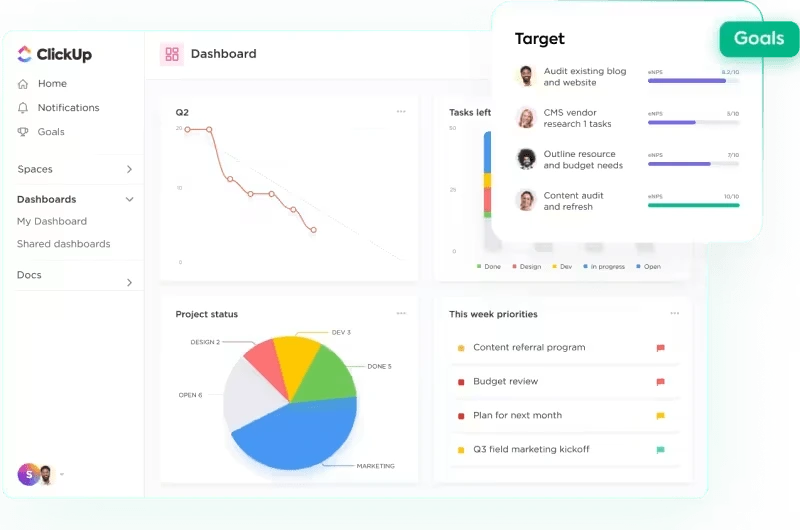
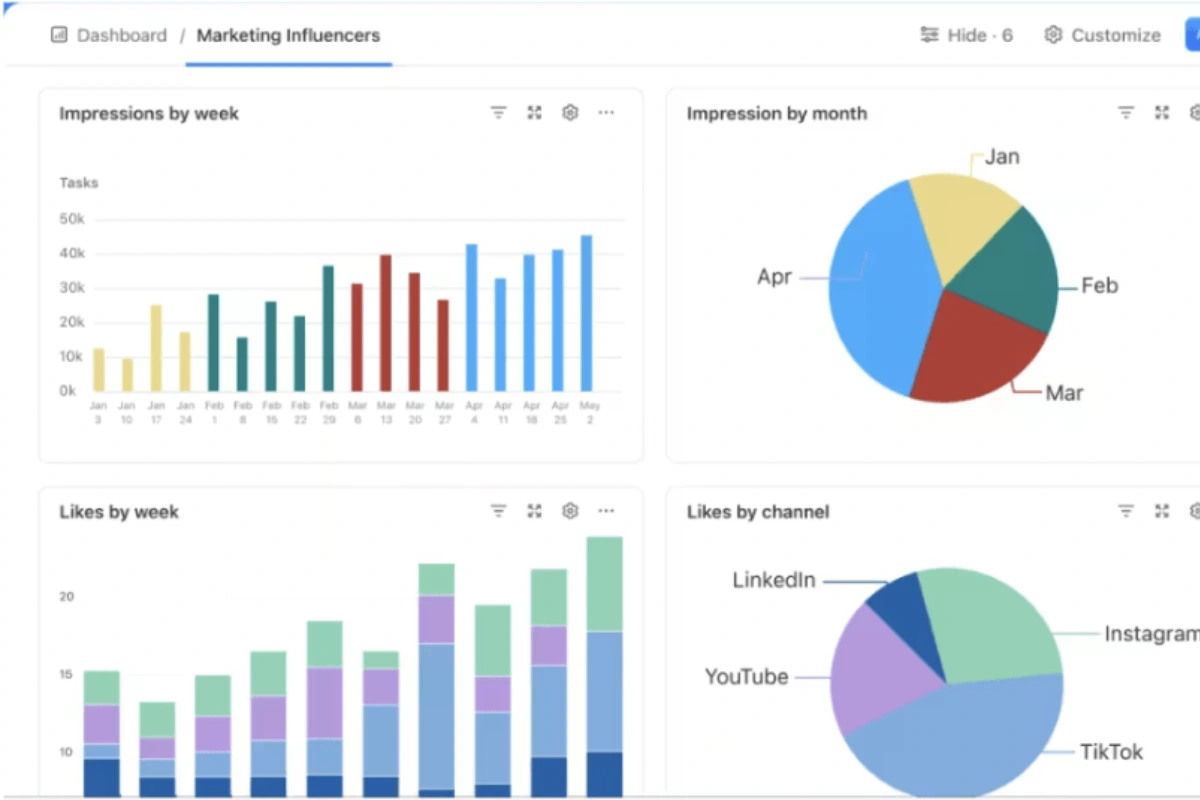
ClickUp’s dashboard functionality gives marketing teams real-time visibility into campaign performance. You can create custom dashboards showing:
- Active campaigns with progress tracking
- Budget utilization across projects
- Team workload distribution
- Sprint velocity for agile marketing teams
The ability to add widgets like time tracking, task status, and custom charts means you can build a command center tailored specifically to your marketing KPIs. Each dashboard is shareable with stakeholders, eliminating the need for separate reporting tools.
Content Calendar & Multiple Views
What sets ClickUp apart is view flexibility. For content marketing teams, you can visualize the same tasks as:
- Calendar view for editorial planning
- Board view (Kanban) for workflow stages
- Timeline view (Gantt) for campaign dependencies
- List view for detailed task management
- Table view for database-style content tracking
This means your content writer can see their assignments in a list, while your marketing director views the same data as a timeline showing how campaigns overlap. No other tool offers this level of view customization at ClickUp’s price point.
Marketing Automation Without Coding
ClickUp includes 100+ free automations on every plan. For marketing teams, this translates to:
- Auto-assigning tasks when content moves to “Review”
- Triggering notifications when campaign deadlines approach
- Moving tasks automatically based on custom field changes
- Creating recurring tasks for weekly social posts
The automation builder uses simple if-this-then-that logic, so even non-technical marketers can build workflows. This alone can save marketing teams 5-10 hours per week on administrative task management.
Marketing-Specific Templates
ClickUp offers 100+ pre-built marketing templates including:
- Social media content calendars
- Campaign planning workflows
- Product launch roadmaps
- SEO content production pipelines
- Event marketing timelines
Each template is fully customizable, and you can save your own workflows as templates for future campaigns. The template library is continually updated based on user needs.
ClickUp Rating Breakdown
Overall: 4.5/5 – ClickUp excels in flexibility and automation, though the initial setup requires time investment.
ClickUp delivers exceptional value for marketing teams willing to invest 2-3 weeks in learning the platform. The customization and automation capabilities justify the steeper learning curve.
Asana for Marketing Teams: Features & Benefits
Clean Interface & Intuitive Design
Asana’s interface feels polished and uncluttered. New team members typically require minimal training—most marketing teams report full adoption within a week. The color-coding system, celebratory animations (like unicorns when completing tasks), and clean typography create a user experience that teams actually enjoy using.
For marketing managers tired of tool resistance, Asana’s low learning curve is a genuine competitive advantage. The mobile app mirrors the desktop experience seamlessly, making it ideal for teams that collaborate on-the-go.
Portfolio Management for Marketing Campaigns
Asana’s Portfolio feature lets marketing directors see all active campaigns in one view. You can track:
- Campaign status across multiple projects
- Resource allocation between teams
- Project health indicators (on track, at risk, off track)
- Timeline views showing campaign dependencies
Portfolios work particularly well for agencies managing multiple client campaigns or enterprise marketing teams running dozens of concurrent initiatives. The ability to generate portfolio-level reports saves significant time during stakeholder meetings.
Timeline View for Campaign Planning
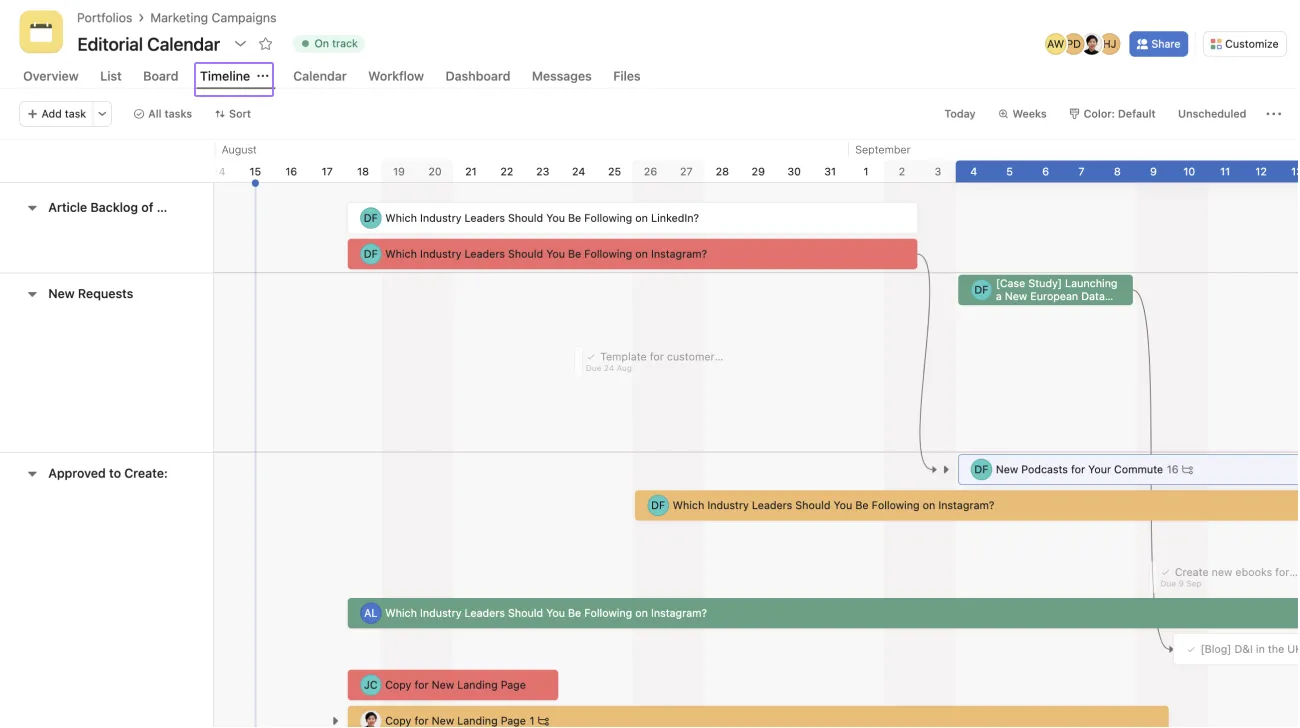
Asana’s Timeline view (their version of Gantt charts) is among the most intuitive in the industry. Marketing teams use it for:
- Mapping campaign phases (awareness, consideration, conversion)
- Identifying bottlenecks in content production
- Visualizing dependencies between creative, copy, and distribution
- Adjusting schedules with drag-and-drop simplicity
The Timeline automatically adjusts dependent tasks when you shift deadlines, preventing scheduling conflicts that plague multi-phase campaigns.
Marketing Templates & Best Practices
Asana provides 50+ curated marketing templates built by their team and marketing leaders from companies like Pinterest and Shopify. Notable templates include:
- Editorial calendars with approval workflows
- Event marketing timelines
- Go-to-market launch plans
- Social media campaign trackers
While fewer than ClickUp’s template library, Asana’s templates follow industry best practices and require minimal customization to deploy.
Asana Rating Breakdown
Overall: 4.2/5 – Asana delivers elegance and ease of use, but lacks the deep customization power users demand.
Asana excels when rapid team adoption and beautiful UX are top priorities, though you’ll pay a premium for this simplicity.
Head-to-Head: Pricing Comparison
ClickUp Pricing Structure
- Free Forever: Unlimited users, 100MB storage, unlimited tasks
- Unlimited ($7/user/month): Unlimited storage, unlimited integrations, unlimited dashboards
- Business ($12/user/month): Advanced automations, custom fields, workload management
- Enterprise (Custom): White labeling, dedicated support, advanced permissions
Asana Pricing Structure
- Basic (Free): Up to 10 users, limited features
- Premium ($10.99/user/month): Timeline, workflow builder, advanced search
- Business ($24.99/user/month): Portfolios, workload management, advanced integrations
- Enterprise (Custom): Admin controls, data export, priority support
Value Analysis: A 15-person marketing team would pay $105/month for ClickUp Unlimited versus $164.85/month for Asana Premium—a 57% cost difference. For detailed pricing breakdowns including hidden costs, see our Is ClickUp Actually Free? guide.
Pricing Verdict
Winner: ClickUp – Significantly better value across all tiers.
ClickUp Rating: 5/5 | Asana Rating: 3.5/5
ClickUp provides more features at lower prices, making it the clear winner for budget-conscious marketing teams without compromising functionality.
Ease of Use: Learning Curve Analysis
ClickUp Learning Curve
ClickUp’s extensive feature set creates a steeper initial learning curve. New users often feel overwhelmed by the customization options. Marketing teams typically need:
- Week 1: Basic task creation and views
- Week 2: Custom fields and automations
- Week 3: Dashboards and advanced features
However, concerned about complexity? Read Is ClickUp Difficult to Learn? for strategies to fast-track adoption.
Asana Learning Curve
Asana prioritizes simplicity. Most marketing team members become productive within 3-5 days. The guided onboarding walks users through core features, and the interface feels familiar to anyone who has used modern productivity apps.
Ease of Use Verdict
Winner: Asana – Dramatically faster adoption with minimal training required.
ClickUp Rating: 3.5/5 | Asana Rating: 4.8/5
Asana wins on ease of use, but ClickUp’s learning investment pays dividends through superior automation and customization for teams willing to climb the learning curve.
Marketing-Specific Features: Campaign Management
Content Calendar Functionality
Both platforms offer calendar views, but ClickUp provides more flexibility. You can customize exactly what information displays on calendar cards (assignee, status, priority, custom fields), while Asana’s calendar shows standard task information only.
For editorial teams managing 50+ content pieces monthly, ClickUp’s filtering and grouping options prevent calendar overload. Asana’s simpler calendar works well for smaller content operations (10-20 pieces monthly).
Campaign Tracking & Analytics
ClickUp’s custom fields and dashboard widgets allow deeper campaign tracking:
- Budget tracking with calculated fields
- Campaign ROI calculations
- Performance metrics by channel
- Conversion funnel visualization
Asana provides basic project status tracking but lacks built-in analytics. Teams typically export data to Google Sheets or BI tools for deeper analysis.
Marketing Automation
ClickUp includes 100+ automations on the free plan, while Asana limits free users to basic rules and charges for workflow builder access. For marketing teams running repetitive processes (content approvals, social scheduling, campaign launches), ClickUp’s automation advantage is substantial.
Marketing Features Verdict
Winner: ClickUp – Superior automation, customization, and analytics for complex marketing operations.
ClickUp Rating: 4.7/5 | Asana Rating: 4.0/5
ClickUp delivers more powerful marketing-specific capabilities, while Asana provides a cleaner, more focused experience for simpler workflows.
Collaboration & Communication
Team Communication
Both platforms offer task comments, file attachments, and @mentions. ClickUp adds:
- Assigned comments (turn discussions into action items)
- Email integration (send/receive emails within tasks)
- Proofing tools (mark up creative assets directly)
Asana focuses on conversation threads within tasks and project discussions. The interface encourages focused communication without feature bloat.
File Management
ClickUp allows unlimited file attachments on paid plans and integrates with Google Drive, Dropbox, OneDrive, and Box. Asana offers similar integrations but limits file storage on lower tiers.
Client Collaboration
Both platforms let you invite external stakeholders as guests. ClickUp provides more granular guest permissions, allowing you to restrict access to specific folders or lists—valuable for agencies managing multiple client accounts.
Collaboration Verdict
Winner: ClickUp (slight edge) – More advanced features for complex collaboration needs.
ClickUp Rating: 4.5/5 | Asana Rating: 4.3/5
ClickUp offers more advanced collaboration features, while Asana keeps communication straightforward and distraction-free.
Pros and Cons: The Real Story
ClickUp: Pros & Cons
Pros
- Exceptional value: Most features at the lowest price point in the industry
- Unmatched customization: Adapt the platform to any marketing workflow
- Powerful automation: Save hours on repetitive task management
- Multiple views: Visualize work exactly how your team needs it
- Generous free plan: Unlimited users and features for small teams
Cons
- Overwhelming at first: Feature density creates a learning curve
- Performance issues: Some users report slower load times with large workspaces
- Mobile app limitations: Not all desktop features available on mobile
Asana: Pros & Cons
Pros
- Beautiful interface: Clean, intuitive design that teams love using
- Quick adoption: Minimal training required for new users
- Excellent timeline view: Industry-leading Gantt chart implementation
- Strong mobile app: Full functionality on iOS and Android
- Proven at scale: Trusted by enterprise marketing teams worldwide
Cons
- Higher pricing: Significantly more expensive for comparable features
- Limited customization: Fewer options to adapt to unique workflows
- Automation paywall: Advanced workflow automation requires expensive plans
Which Tool Should You Choose?
Choose ClickUp If:
- You need maximum customization for complex marketing operations
- Budget is a primary concern and you want the most features per dollar
- Your team requires advanced automation for repetitive workflows
- You manage diverse campaign types needing different views and structures
- You have the time to invest in learning a more powerful platform
Choose Asana If:
- You prioritize simplicity and quick adoption over feature depth
- Your team values beautiful UX design and user experience
- You run straightforward marketing campaigns without complex dependencies
- Enterprise support and stability are non-negotiable requirements
- You need a tool that non-technical team members will embrace immediately
Still undecided? Explore our ClickUp Alternatives guide comparing 7 leading project management tools for marketing teams.
Real User Experiences: What Marketing Teams Say
Marketing teams consistently praise ClickUp’s value proposition. One content marketing manager noted: “We switched from Asana to ClickUp and immediately saved $3,000 annually while gaining automation features Asana charges double for.”
However, Asana users emphasize adoption speed. An agency creative director shared: “We tried ClickUp but our freelancers refused to use it. Switched to Asana and everyone was productive in days, not weeks.”
Common ClickUp Feedback Themes
- Incredible value and features
- Steep but worthwhile learning curve
- Occasional performance slowdowns
- Outstanding customer support
Common Asana Feedback Themes
- Intuitive and beautifully designed
- Expensive for advanced features
- Excellent for visual timeline planning
- Limited customization frustrates power users
Frequently Asked Questions
Is ClickUp better than Asana for marketing teams?
ClickUp offers better value and more features for most marketing teams, particularly those on tight budgets needing automation and customization. Asana excels when ease of use and rapid adoption are top priorities. For budget-conscious teams with time to learn, ClickUp provides superior ROI.
Can I migrate from Asana to ClickUp easily?
Yes. ClickUp offers a dedicated Asana import tool that transfers projects, tasks, assignees, and due dates. The migration typically takes 15-30 minutes for small marketing teams. However, custom workflows and automations require manual recreation.
Which has better reporting for marketing campaigns?
ClickUp’s custom dashboards and calculated fields enable deeper campaign analytics without external tools. Asana provides basic project reporting but requires data exports for advanced analysis. For data-driven marketing teams, ClickUp’s reporting capabilities are significantly stronger.
How do they compare for content calendar management?
Both work well for content calendars. ClickUp offers more view options and customization (custom fields for content type, status, performance metrics), while Asana provides a cleaner, more focused calendar experience. High-volume content teams (50+ pieces monthly) benefit from ClickUp’s filtering capabilities.
What about integrations with marketing tools?
ClickUp integrates with 1,000+ tools including HubSpot, Mailchimp, Google Analytics, Slack, and social media platforms. Asana offers 200+ integrations covering major marketing tools. Both provide Zapier support for custom integrations. ClickUp’s native integration library is more comprehensive.
Also compare: ClickUp vs Notion for knowledge management and ClickUp vs Monday for visual workflow boards.
Final Verdict: The Winner for Marketing Teams
For most marketing teams in 2026, ClickUp offers superior value, features, and scalability. The combination of generous free plans, powerful automation, and unlimited customization makes it the better long-term investment for growing marketing operations.
However, if your marketing team values intuitive design over feature density and has budget flexibility, Asana’s user experience excellence justifies the premium pricing.
My Recommendation
Start with ClickUp’s free plan to test its capabilities. If your team struggles with adoption after 2-3 weeks, Asana’s Premium plan provides a more accessible alternative.
Ready to transform your marketing workflow? Try ClickUp free for 30 days (no credit card required) and see why over 10,000 marketing teams have made the switch.
Try ClickUp Free
Best value with 100+ automations, unlimited views, and superior customization for complex marketing workflows.
Start Free Trial →Try Asana Free
Beautiful interface with rapid adoption for teams prioritizing simplicity and intuitive design over deep features.
Start Free Trial →