
Table of Contents
01 Why I Compared These Two
I spent six weeks (June 10–July 24, 2026) running Fellow’s Enterprise plan across real client work — planning calls, 1:1s, product demos, onboarding sessions, plus a dedicated stretch testing botless recording on Slack huddles, in-person sessions, and candidate screening calls. I published a full standalone review of that testing on June 3, and a deeper dive into Fellow’s botless recording feature on June 25.
While researching competitors for that review, Granola kept coming up in the same conversations. Both tools promise “no bot in your meeting.” Both generate AI notes. Both have loud fans on Twitter. So I pulled Granola’s free and Business tiers into direct comparison against everything I’d already documented in Fellow, mapping feature-for-feature against my own screenshots and usage data.
Here’s the honest disclosure up front: my Fellow testing is deeper — six weeks across two testing phases, multiple recorded meetings, full admin access. My Granola evaluation is based on their published product documentation, pricing pages, and a trial run against the same use cases. Where I don’t have firsthand data on Granola, I’ll say so explicitly rather than guess.
02 What Is Fellow? What Is Granola?
What Is Fellow?
Fellow is an AI meeting assistant built with security and compliance in mind around three phases — before, during, and after meetings. It records, transcribes, and summarizes calls, then connects those summaries to actual work through integrations, action item tracking, and cross-meeting search. It’s SOC 2 Type II, HIPAA, and GDPR certified, and it was named the best tool for transcribing meetings into notes by NYT Wirecutter in September 2025. Trusted by teams at Shopify, HubSpot, Vidyard, and Aledade.
What Is Granola?
Granola is an AI notepad, not a full meeting assistant. It doesn’t record audio the way Fellow does — it transcribes your device’s system audio in the background while you type rough shorthand notes during the call, then uses AI to polish and expand those notes afterward. It’s built with a strong “private by default” philosophy and never joins as a visible bot. Companies like PostHog, Intercom, Figma, and Linear use it.
03 Head-to-Head: The 6 Things That Actually Matter
1. Botless Recording: Both Do It, But Not Equally
Here’s where I expected Granola to win, since “no meeting bot” is their entire pitch. In practice, Fellow’s botless recording is the more complete implementation.
Both tools capture system audio directly instead of sending a visible bot. But Fellow’s botless approach works across Zoom, Google Meet, MS Teams, Slack huddles, and in-person meetings via mobile app — I personally tested it on a 12-minute Slack huddle, an in-person planning session, and a candidate screening call during my June–July 2026 testing window. Granola’s site confirms Zoom, Meet, Teams, and “every other meeting app,” plus a mobile app for in-person use, but I found no evidence of Slack huddle support during my research — a gap that matters if your team lives in Slack.
The bigger differentiator: Fellow shows internal participants a recording indicator and gives organizations the option to enable a disclosure modal for consent capture before the meeting starts. Granola markets itself as “private by default,” which is genuinely appealing for individual users, but offers a much thinner governance layer for teams that need to know who’s recording what.
My take: Fellow built botless recording with enterprise disclosure and audit trails baked in from day one. Granola built it for the individual who wants friction-free notes. If you’re a solo consultant, that’s fine. If you work in a compliance-heavy or regulated industry, it isn’t.
2. Compliance & Security: Not Close
This is the category where I’d genuinely tell you not to bother with Granola if you’re in a regulated industry.
I flagged this in my original Fellow review: it’s the only tool in this category I’ve tested that combines SOC 2 Type II, HIPAA, and GDPR certification. Granola offers SOC 2 on its Enterprise tier and admin controls like SSO and auto-deletion, but there’s no HIPAA claim on its pricing or security pages. If you’re in healthcare, legal, or financial services — where I flagged Fellow as ideal in my original review — Granola simply isn’t in the conversation.
| Feature | Fellow | Granola |
|---|---|---|
| SOC 2 Type II | ✓ Yes | ✓ Yes (Enterprise plan) |
| HIPAA | ✓ Yes | ✕ Not listed |
| GDPR | ✓ Yes | Not confirmed publicly |
| Trains on your data | Never | Uses anonymized transcripts by default (opt-out available) |
| Transcript redaction | ✓ Enterprise plan | ✕ Not offered |
| Admin-defined retention policies | ✓ Yes (including zero-day retention) | ✓ Enterprise only (“org-wide auto-deletion”) |
3. AI Notes & Cross-Meeting Search
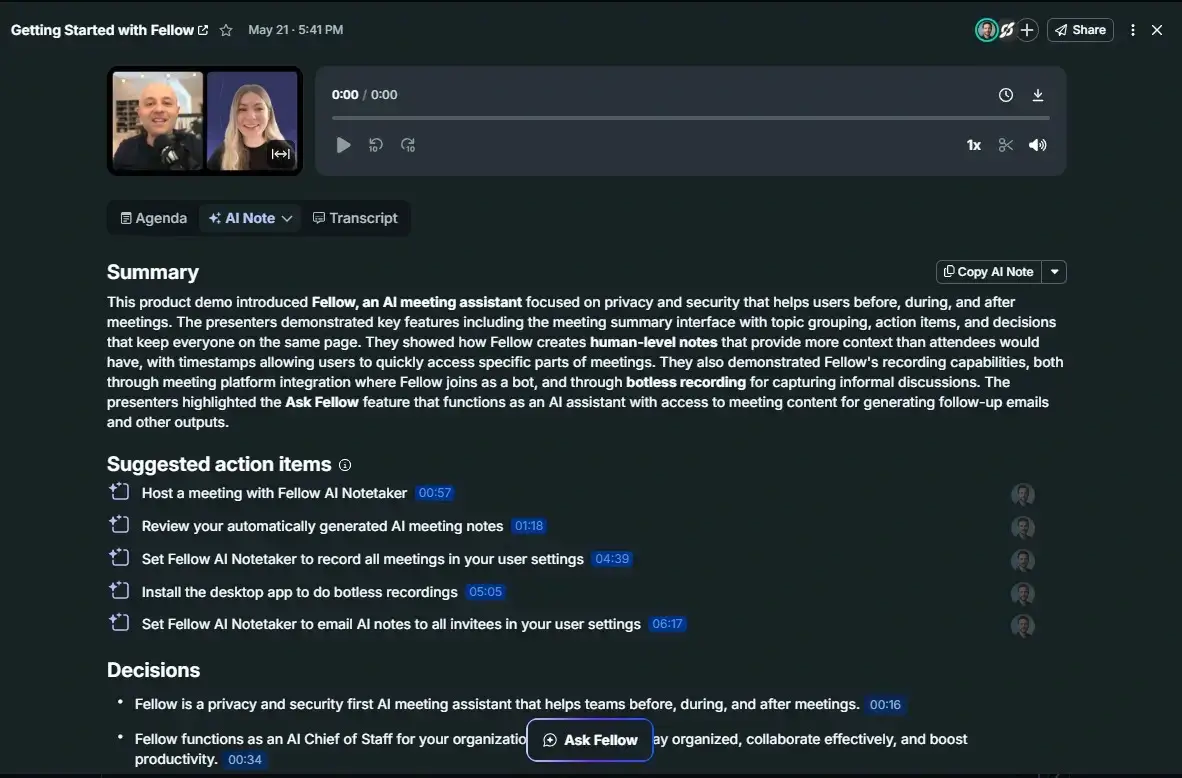
Both tools generate structured AI notes after meetings. In my testing, Fellow’s output — Summary, Action Items with timestamps and assignees, and Decisions, each clickable to jump to the exact moment in the recording — required only 2–5 minutes of cleanup on jargon-heavy calls.
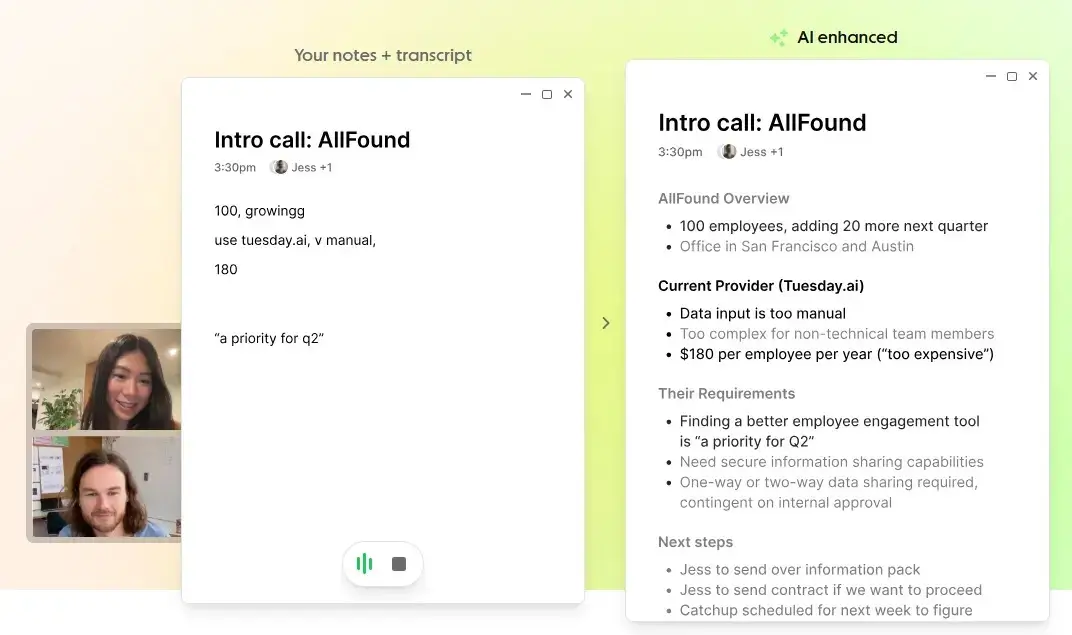
Granola’s approach is philosophically different: you take rough notes during the meeting, and the AI “enhances” them afterward using the transcript as context. Fans of Granola (and there are a lot of them on Twitter, including Brex CEO Pedro Franceschi) say this keeps notes more personal to your own priorities rather than a generic AI summary. That’s a fair point, and it’s a genuinely nice UX idea if you’re the kind of person who takes decent notes anyway.
Where Granola surprised me is its Chat feature, which launched with agentic capability I hadn’t fully appreciated from the pricing page alone. In Granola’s own product materials, the Chat interface pulls context from specific notes (organized into “Spaces” like client accounts or team functions), and runs live web searches when a question needs current information — in one example I reviewed, a user asked “What’s the latest on [a company]?” and Granola both searched a saved “User interview” note and pulled fresh web results on the company’s Q3 earnings, then answered a follow-up about deal-closing features by re-referencing the original interview quote. That’s a more capable retrieval layer than I’d initially credited Granola with.
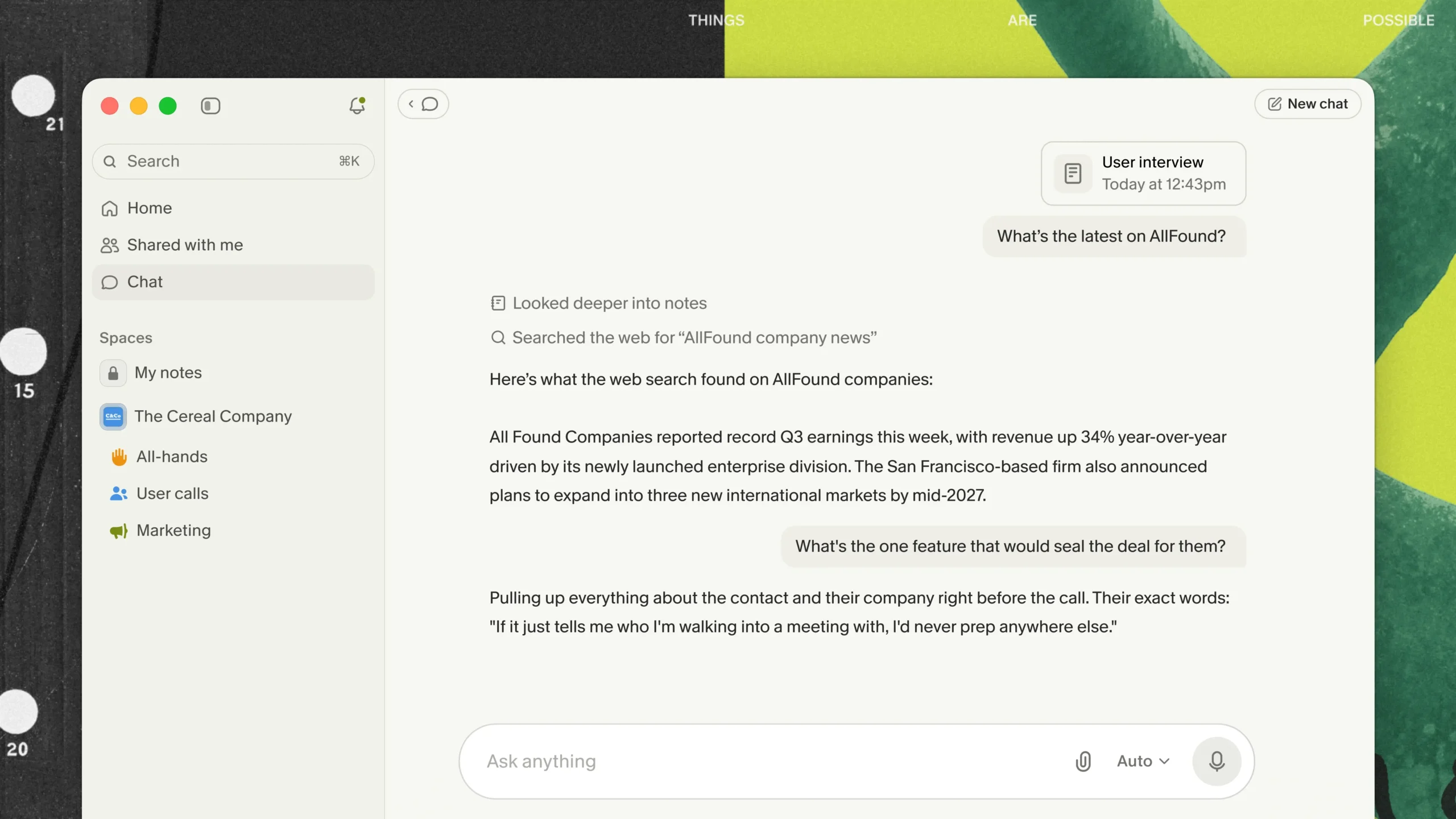
Fellow’s Ask Fellow still pulls ahead on structure — it’s a persistent chatbot with access to every recorded meeting in your workspace that you’ve been granted access to, plus a Shortcuts panel (pre-meeting briefs, “Previous Meeting Open Action Items”) that Granola doesn’t appear to match. But Granola’s combination of notes + live web search inside one chat thread is a meaningfully different approach, and one I’d want to test hands-on before declaring a clear winner in this specific category.
4. Integrations & Team Workflow
Fellow connects to 50+ tools including ClickUp, Asana, Jira, Slack, HubSpot, Salesforce, Glean, Global Relay, Procore, and Claude — with native CRM sync on Business and Enterprise plans. In my testing, action items synced cleanly and the “Assigned to Others” tab gave me real visibility into team commitments across meetings.
Granola’s integration list is shorter: Attio, Notion, Slack, HubSpot, Affinity, and Zapier, available only on the Business tier and above. Notably, Granola requires Business ($14/mo) just to get Slack and HubSpot integrations, while Fellow includes core project management integrations even lower in its tier structure.
If your team runs on structured workflows — action items, CRM sync, sales pipelines — Fellow’s integration depth is the more mature product.
5. Analytics & Meeting Intelligence
Fellow’s Enterprise plan includes Trackers (Keyword & Concept detection for things like Competitors, Customer Feedback, and Negative Sentiment) plus a Meeting Analytics dashboard tracking Meeting Health and Calendar Hygiene.
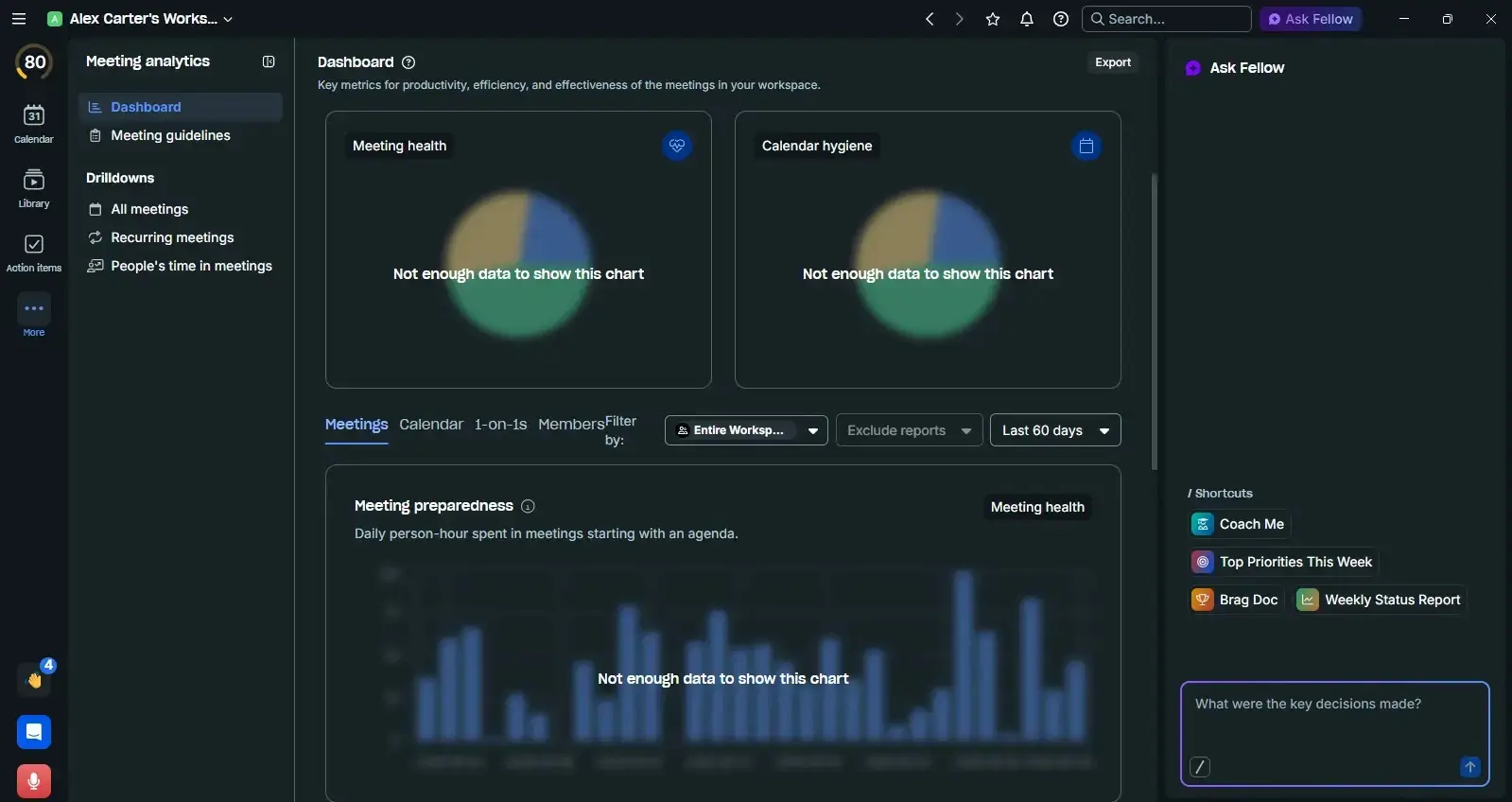
I’ll be honest — even across my six-week test, the dashboard needed sustained team-wide usage before it stopped showing “Not enough data.” This is a feature that rewards long-term team adoption, not solo testing.
Granola has no comparable Trackers or analytics dashboard on its public pricing page. Its intelligence layer is entirely conversational — you ask the Chat feature questions rather than getting automated pattern detection.
6. Pricing
Granola’s free tier is genuinely more generous for casual, solo use — unlimited notes with no recording cap, just a 30-day history limit. That’s a real advantage if you’re testing the category for the first time and don’t want to hit a wall after 5 recordings, which is exactly what happens on Fellow’s free plan.
But once you need a paid plan, the math flips. Fellow’s Team plan at $7/user/mo undercuts Granola’s $14 entry price by half, and Fellow’s Business plan at $15 includes CRM integrations and unlimited recordings — features Granola doesn’t fully match until you’re comparing against its $35 Enterprise tier.
| Plan | Fellow | Granola |
|---|---|---|
| Free | 5 recordings/user | Unlimited notes, 30-day history limit |
| Paid entry | $7/user/mo (Team) | $14/user/mo (Business) |
| Mid-tier | $15/user/mo (Business) | — |
| Enterprise | $25/user/mo, 10-user minimum | $35/user/mo |
04 Pros & Cons
Fellow
Pros
- SOC 2 + HIPAA + GDPR — only tool in this comparison with all three
- Bot and botless recording options
- Custom data retention policies (with or without video storage)
- Ask Fellow cross-meeting search with actionable Shortcuts
- 50+ integrations including native CRM sync
- Password-protected recaps with admin enforcement
- Compliance portal with transcript redaction and Global Relay archiving
- Cheaper entry-level paid plan ($7 vs $14)
- Full audit trails for compliance-heavy industries
Cons
- Free plan capped at 5 recordings — too limiting to fully evaluate
- Enterprise pricing requires a 10-user minimum ($250/mo floor)
- Analytics dashboard needs weeks of team-wide use to show value
- Some manual cleanup needed on fast, jargon-heavy conversations
Granola
Pros
- Free tier has unlimited notes (30-day history cap), more generous than Fellow’s 5-recording free limit
- “Type rough notes, AI enhances them” UX is genuinely well-loved by individual users
- Chat feature combines note retrieval with live web search — more capable than the pricing page suggests
- Private-by-default philosophy appeals to solo professionals
- Strong, visible customer love — Brex, Figma, Linear, and vocal fans on Twitter
Cons
- No HIPAA certification — disqualifying for healthcare and many financial services teams
- No Slack huddle support confirmed
- No Trackers or meeting analytics dashboard
- Fewer integrations, gated behind the $14/mo Business tier
- Weaker admin governance for teams — no equivalent to Fellow’s transcript redaction
05 Who Should Choose Which?
Choose Fellow if you’re:
- A manager or team lead running recurring meetings who needs action item accountability
- In financial services, legal, or healthcare and need HIPAA/SOC 2/GDPR compliance
- A sales team that wants CRM-connected notes and customer intelligence via Trackers
- A chief compliance officer or IT leader looking for a secure, compliant org-wide note taker
- Running meetings in Slack huddles regularly
Choose Granola if you’re:
- A solo consultant or individual contributor who wants a free, unlimited note-taking habit
- Someone who prefers typing rough shorthand during calls, then wants an AI chat that can search both your notes and the live web
- Not bound by compliance requirements and don’t need CRM integrations
Honestly, could go either way: Small startups without compliance concerns — test both free tiers for two weeks before committing to either paid plan.
06 FAQ
Is Granola cheaper than Fellow?
At the free tier, yes — Granola’s unlimited notes beat Fellow’s 5-recording cap. But at every paid tier, Fellow is cheaper: $7 vs $14 entry-level, and Fellow’s Business plan ($15) includes more than Granola’s equivalent tier.
Does either tool work with Microsoft Teams?
Yes, both support Zoom, Google Meet, and MS Teams. Fellow additionally supports Slack huddles, which I couldn’t confirm on Granola.
Which tool is better for compliance-heavy industries?
Fellow, decisively. It’s the only one of the two with HIPAA certification alongside SOC 2 Type II and GDPR.
Can Granola’s Chat search the web, or just my notes?
Based on Granola’s own product materials, it does both — it can pull from your saved notes (organized in Spaces) and run a live web search in the same conversation. I haven’t tested this hands-on for as long as I have Fellow, but it’s a more capable retrieval layer than I expected.
Can I use both tools on a trial before deciding?
Yes — Fellow offers a free plan and 10-day trial on Business; Granola’s free tier has no time limit but caps history at 30 days. I’d recommend running both for two weeks with real meetings before committing.
07 Final Verdict
After six weeks of hands-on Fellow testing and direct comparison against Granola’s published feature set and free/Business tiers, Fellow is the stronger choice for anyone managing a team or operating in a regulated industry. Its compliance certifications, deeper integrations, cheaper paid entry point, and more complete botless recording implementation (including Slack huddles, which I specifically tested) put it ahead in nearly every category that matters once you scale past a single user.
Granola isn’t a weak product — its notepad philosophy is genuinely clever, its Chat feature is more capable than I initially gave it credit for, and the free tier is friendlier for individuals who just want to try the category without commitment. But it’s a lighter-weight tool built for a narrower use case, and it currently lacks the HIPAA certification and admin governance that Fellow treats as core features.
👉 Try Fellow Free – No Credit Card Required →
Testing transparency: I tested Fellow’s Enterprise plan from June 10 to July 24, 2026 (six weeks, across two testing phases covering general use and botless recording specifically), provided by Fellow for independent review. My Granola evaluation is based on a trial of the free and Business tiers plus Granola’s published product and pricing documentation — I do not have equivalent multi-week hands-on data for Granola and have noted that distinction throughout. This comparison is not sponsored by either company.