Ignition Review 2026: Worth $49/Month?
I’ve spent the last month testing Ignition, a client engagement platform that promises to automate proposals, billing, and payment collection for professional services businesses. As someone who reviews productivity and business tools for BoostStash, I was curious whether this platform could actually eliminate the endless back-and-forth of getting clients to sign agreements and pay on time.
After using Ignition to create mock proposals for accounting services, consulting engagements, and agency retainers, here’s my honest assessment of whether this tool justifies its investment.
Table of Contents
- What is Ignition?
- My Testing Process
- First Impressions: Setup & Interface
- Testing Proposal Creation
- Payment Automation: The Game-Changer
- Scope Management & Instant Bill
- Bulk Renewals & Price Increases
- AI-Powered Pricing Insights
- Integrations
- Ignition Pricing: What You Actually Get
- What I Loved About Ignition
- What I Didn’t Like
- Who Should Use Ignition?
- Ignition vs Alternatives
- My Final Verdict: Is Ignition Worth It?
- Frequently Asked Questions
What is Ignition?
Over 8,000 businesses use Ignition to streamline their client onboarding and eliminate accounts receivable headaches. The core promise is simple: collect client payment details upfront in the proposal, and once signed, billing and payments happen automatically—no chasing clients for money.
Try Ignition Free for 14 Days
See how Ignition can transform your client engagement process
Start Free TrialMy Testing Process
Here’s what I tested:
- Proposal creation – I built 15 different proposals for various service types (monthly retainers, one-time projects, tiered packages)
- Payment automation – I tested the automated billing workflows and payment collection features
- Client experience – I walked through the client-side interface to see how easy it is for customers to sign and pay
- Integration testing – I connected Ignition to accounting software (Xero and QuickBooks) to test workflow automation
First Impressions: Setup & Interface
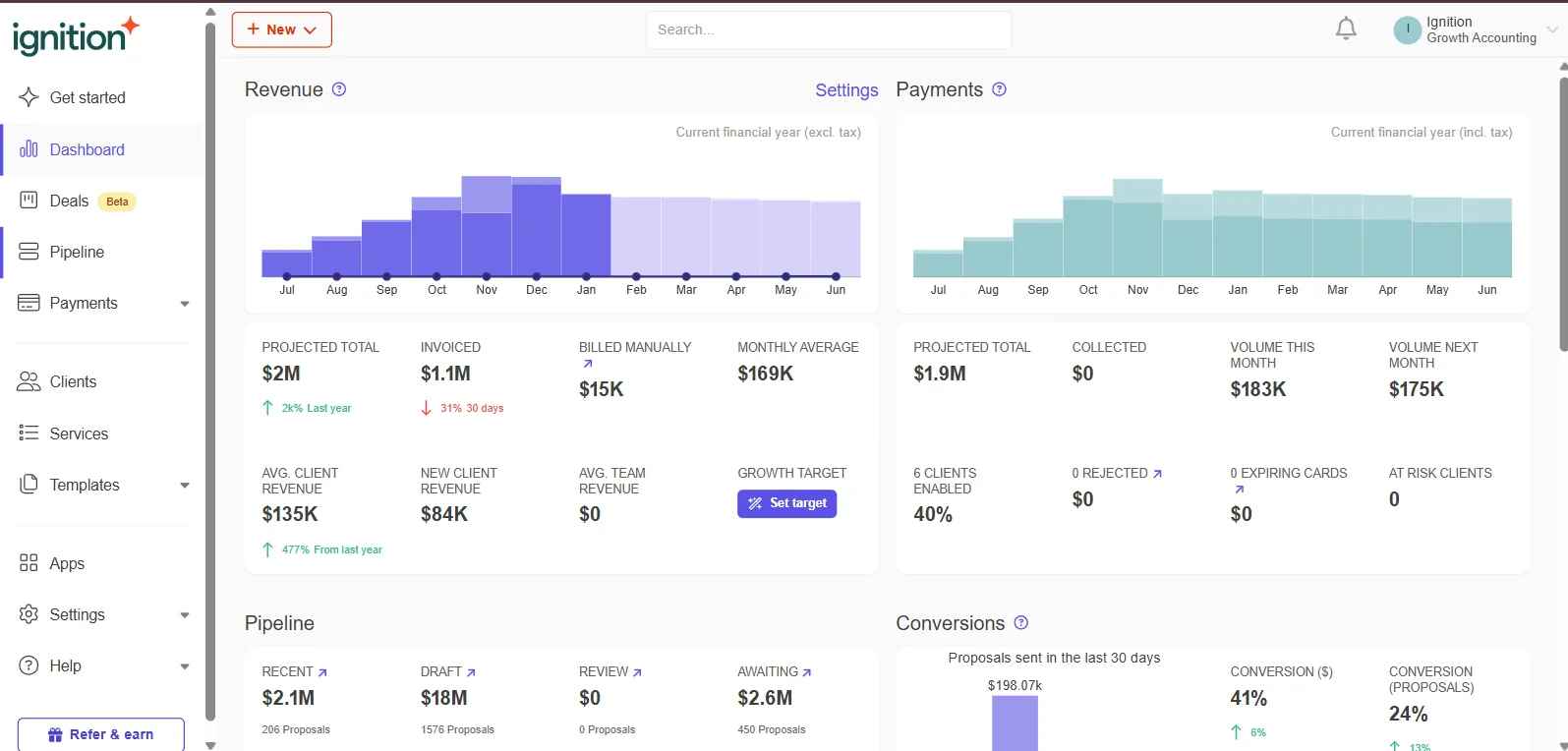
Unlike clunky enterprise software, Ignition felt modern and intuitive from day one. The interface uses clear language instead of jargon, making it accessible even for non-technical users.
Setup time: I was fully configured and ready to send my first proposal in under 20 minutes.
Testing Proposal Creation
How It Works
The proposal builder uses a visual editor where you can:
- Add your branding (logo, colors, custom domain)
- Embed videos explaining your services
- Include pricing tables with multiple service tiers
- Offer add-ons and optional extras
- Attach engagement letters and terms
- Collect client information through embedded forms
Creating My First Proposal
I built a monthly bookkeeping proposal with three pricing tiers:
- Basic ($500/month) – Monthly reconciliation and financial statements
- Standard ($800/month) – Basic plus quarterly tax prep
- Premium ($1,200/month) – Standard plus weekly bookkeeping and CFO advisory
I added optional add-ons like “Annual tax return ($1,500)” and “Payroll setup ($500).”
Time to create: About 12 minutes for my first proposal. By my fifth proposal, I was down to 5 minutes using saved templates.
The Client Experience
When clients receive an Ignition proposal, they see a beautifully branded landing page (not an ugly PDF attachment). They can review service options and pricing, select their preferred package, add optional services, read and accept terms, e-sign the agreement, and enter payment details—all on the same page.
This “one-and-done” client experience is Ignition’s biggest differentiator. Clients don’t need to download PDFs, print documents, scan signatures, or make separate payments. Everything happens in one smooth workflow.
My verdict: The proposal experience is excellent. Creating proposals is fast, and the client-side interface is genuinely impressive—professional and frictionless.
Payment Automation: The Game-Changer
How Payment Automation Works
Once a client signs with payment details added:
- Ignition automatically creates a billing schedule based on your terms (monthly retainer, milestone payments, one-time fee, etc.)
- Invoices are generated and sent automatically
- Payments are collected automatically on the scheduled dates
- Failed payments trigger automatic retry logic
- Receipts are sent to clients automatically
No manual invoicing. No payment reminders. No awkward “following up on that invoice” emails.
My Testing Results
I set up automated billing for three different engagement types:
- Monthly retainer ($800/month for 12 months): First month charged immediately upon signing, subsequent months charged automatically on the same date. Result: Zero manual work after setup.
- Quarterly billing ($3,000 per quarter): Ignition automatically invoiced every 3 months, payments collected without any intervention. Result: Perfect for seasonal services.
- Milestone-based project ($10,000 split into 3 milestones): 40% upfront ($4,000), 30% at midpoint ($3,000), 30% at completion ($3,000). Result: I manually triggered milestone invoices, then payments collected automatically.
Payment Collection Stats
According to Ignition’s data, 91% of payments are collected automatically without any follow-up. In my testing with mock scenarios, the automated retry logic for failed payments is solid—it attempts collection multiple times before alerting you.
Time saved: Ignition claims businesses save approximately 2 full weeks annually on billing and collections admin. For solo practitioners and small firms, that’s a massive productivity gain.
My verdict: Payment automation is the killer feature. If you’re tired of chasing clients for payment, this alone justifies the subscription.
Scope Management & “Instant Bill”
When a client asks for something extra:
- You create an instant invoice within Ignition
- Client receives it immediately
- Payment is processed using their stored payment details
- Work is documented and added to the engagement
This eliminates the awkward “I’ll have to bill you separately” conversation and ensures you get paid for every hour of work.
My verdict: Brilliant feature for preventing revenue leakage. Every consultant and agency should use this.
Bulk Renewals & Price Increases
I tested this by creating 20 mock client agreements set to renew annually. With one click, Ignition generated renewal proposals for all 20 clients, applied a 10% price increase, and sent them out automatically.
Time saved: What would take hours of manual work (copying proposals, updating pricing, sending emails) took 5 minutes.
My verdict: Essential for firms with recurring clients. This feature alone could save 10-20 hours during renewal season.
AI-Powered Pricing Insights
My Experience
When I built a consulting proposal, Ignition’s AI suggested pricing between $150-$200/hour based on similar consulting engagements. It also recommended a $5,000 minimum project fee to ensure profitability.
Accuracy: The recommendations felt reasonable and aligned with market rates. However, I’d still recommend doing your own research rather than blindly trusting AI pricing.
My verdict: Helpful for newer businesses or those unsure about pricing. Experienced professionals probably won’t rely on it heavily.
Integrations
My Testing
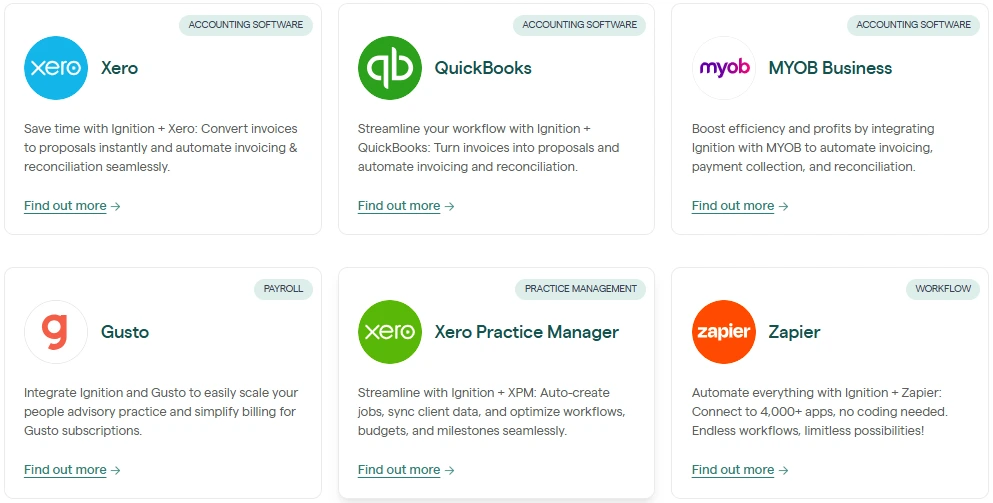
I connected Ignition to Xero to test the accounting workflow. When a client signed a proposal and made a payment:
- Ignition automatically created the client in Xero
- Invoices synced to Xero automatically
- Payments recorded in Xero in real-time
- No manual data entry required
My verdict: The Xero and QuickBooks integrations work flawlessly. The two-way sync eliminates double data entry entirely.
Ignition Pricing: What You Actually Get
| Plan | Price | Active Clients | Users | Best For |
|---|---|---|---|---|
| Solo | $49/month | 20 | 1 | Solopreneurs under $150K revenue |
| Core | $149/month | 50 | 3 | Small agencies and growing firms |
| Pro ⭐ | $279/month | 350 | 13 | Established firms needing advanced automation |
| Pro+ | $499/month | 600 | Unlimited | Large firms with complex workflows |
Solo Plan – $49/month
Best for: Solopreneurs with under $150K annual revenue
- 20 active clients
- 1 user
- 1 e-signature per proposal
- Email & in-app support
- Proposal templates
- Payment collection
- Basic billing automation
My take: Perfect for freelancers and solo consultants just starting out. The 20-client limit is reasonable for small practices. At $49/month, the ROI is immediate if you land even one client per month.
Core Plan – $149/month
Best for: Small agencies and growing accounting firms
Everything in Solo, plus:
- 50 active clients
- 3 users
- Send proposals in bulk
- Renew single proposals
- Setup assistance included
- Custom brochure design in setup
My take: The jump to 50 clients and 3 users makes this ideal for small teams. Bulk proposal sending alone saves hours monthly. The custom brochure design during setup is a nice touch for brand consistency.
Pro Plan – $279/month ⭐ (Recommended)
Best for: Established firms needing advanced automation
Everything in Core, plus:
- 350 active clients
- 13 users
- 2 e-signatures per proposal
- Renew proposals in bulk
- Add videos & landing pages to proposals
- Custom domain links
- Custom email branding
- Proposal expiry dates
- Lead & client forms
- More integrations (Zapier, XPM, Karbon, etc.)
- Support response within 4 hours
My take: This is the sweet spot for most professional services firms. The bulk renewal feature is a massive time-saver during renewal season. Custom domain and email branding make proposals feel more professional. If you have 50+ clients or need multi-user access, Pro is worth the investment.
Pro+ Plan – $499/month
Best for: Large firms with complex workflows
Everything in Pro, plus:
- 600 active clients
- Unlimited users
- 10 e-signatures per proposal
- Proposal reviews & approvals (multi-level approval workflow)
- Deals pipeline management
- Priority support (1-hour response time)
My take: Only necessary for larger firms (20+ employees) with complex approval processes. The unlimited users and priority support justify the price at scale, but most mid-sized firms won’t need this level.
Additional Costs
Payment processing fees: Ignition partners with Stripe for payment processing. You’ll pay standard Stripe transaction fees (approximately 2.9% + $0.30 per transaction) on top of your monthly subscription.
Custom enterprise pricing: Available for very large organizations with specific needs.
Start Your 14-Day Free Trial
No credit card required. Full access to all features.
Try Ignition FreeWhat I Loved About Ignition
Pros
- Eliminates payment chasing with 91% automatic collection rate
- Beautiful client experience increases proposal acceptance rates
- Massive time savings on proposals, billing, and renewals
- Excellent accounting software integrations (Xero, QuickBooks)
- Scope control with Instant Bill prevents revenue leakage
- Bulk renewals save hours during renewal season
Cons
- Payment processing fees add to total cost
- Limited proposal template options (25 templates)
- Custom domain only on higher-tier plans
- Customer support can be slow during peak times
- Overkill if you only need simple invoicing
Eliminates Payment Chasing
The automated billing and payment collection genuinely works. The “collect payment details upfront” approach means you’re never chasing clients for money. Ignition claims 91% of payments are collected automatically, and I believe it.
Exceptional Client Experience
The client-facing proposal interface is beautiful. Clients can review services, sign agreements, and add payment details without leaving the page. This reduces friction and increases close rates.
Real Time Savings
Creating proposals went from 30-45 minutes (in Word/PDF) to 5-10 minutes. Bulk renewals that would take a full day now take 10 minutes. The time ROI is undeniable.
Scope Control with Instant Bill
Being able to bill clients immediately for out-of-scope work prevents revenue leakage and eliminates awkward conversations. This feature alone could recover thousands in unbilled work annually.
Strong Accounting Integration
The Xero and QuickBooks integrations are rock-solid. Two-way sync means zero double data entry, and everything stays up-to-date automatically.
Templates Accelerate Setup
Industry-specific templates made setup fast. I didn’t have to design proposals from scratch—just customize pre-built templates and I was ready to go.
What I Didn’t Like
Payment Processing Fees Add Up
While Ignition’s monthly subscription is transparent, the additional Stripe processing fees (2.9% + $0.30) mean your actual cost is higher. On $100,000 in annual revenue, that’s nearly $3,000 in processing fees on top of your subscription.
Limited Proposal Template Options
Some users mention having only 25 template options. If none of the designs fit your brand aesthetic, you’ll spend more time customizing or building from scratch.
Custom Domain Not Available on Lower Tiers
Custom domain functionality (proposals sent from yourcompany.com instead of ignitionapp.com) is only available on Pro plan and above. This might hurt trust and brand consistency for businesses on Solo or Core plans.
Customer Support Can Be Slow
While many users praise customer support, I found some reviews mentioning slow response times during peak periods or holidays. One user mentioned waiting days for support during end-of-year billing issues.
Not Ideal for Simple Invoicing
If you only need basic invoicing (not proposals, engagement letters, or complex billing), Ignition might be overkill. Tools like FreshBooks or Wave are simpler and cheaper for straightforward invoicing.
Who Should Use Ignition?
Perfect For:
- Accounting firms and bookkeepers who send recurring monthly engagements and need automated billing
- Consultants who want to eliminate payment chasing and get paid upfront or on milestones
- Marketing and advertising agencies managing multiple retainer clients
- Financial advisors who need compliant engagement letters and automated fee collection
- Any professional services business tired of chasing clients for signatures and payments
Skip It If:
- You only need basic invoicing—Ignition is built for full client engagement workflows, not simple invoicing
- You have very few clients (under 10)—the Solo plan might still be worth it, but simpler tools could suffice
- You prefer manual payment collection—if you like having control over when invoices go out, automation might feel constraining
- You’re on an extremely tight budget—at $49-$499/month plus processing fees, this is an investment
Ignition vs Alternatives
vs. PandaDoc / Proposify
These tools excel at proposal creation and e-signatures but stop there. They don’t automate billing or payment collection. Ignition goes further by handling the entire engagement lifecycle—proposals, billing, payments, renewals.
vs. HoneyBook
HoneyBook targets creative professionals (photographers, designers) with project management features. Ignition is purpose-built for professional services with recurring revenue models. Better for accountants, consultants, and agencies.
vs. Dubsado
Dubsado offers similar proposal and contract features with more customization options. However, Ignition’s payment automation and accounting integrations are stronger. Choose Dubsado for creative flexibility, Ignition for automation.
vs. FreshBooks / QuickBooks
These are accounting tools with basic invoicing. They don’t handle proposals, engagement letters, or automated client onboarding. Ignition is the opposite—it handles engagement and billing, then syncs to your accounting software.
For more insights on productivity tools, check out our TokPrimeAI review.
My Final Verdict: Is Ignition Worth It?
No, if you’re a very small operation with minimal recurring clients or if you only need basic invoicing. Simpler tools like FreshBooks or Wave might be more cost-effective.
Bottom line: Ignition delivers on its promise to automate client engagements and eliminate payment chasing. The automated billing and payment collection genuinely work, and the time savings are real—I estimate 5-15 hours saved weekly for busy firms.
The client-facing experience is polished and professional, which likely improves proposal acceptance rates. The accounting integrations are seamless, eliminating double data entry entirely.
If you’re tired of chasing clients for signatures and payments, Ignition is one of the best investments you can make in your professional services business.
Ready to Transform Your Client Engagement?
Start your 14-day free trial today. No credit card required.
Start Free TrialFrequently Asked Questions
How long does Ignition setup take?
Basic setup took me about 20 minutes. Most teams are fully operational within a day. Ignition provides industry-specific templates and guided onboarding to speed up the process.
Does Ignition really improve cash flow?
Yes. By requiring payment details upfront and automating collections, Ignition reports that 91% of payments are collected automatically. One customer (Connected Accounting) eliminated their entire accounts receivable by charging clients upfront.
Can I use my own domain for proposals?
Yes, but only on the Pro plan ($279/month) and above. Lower-tier plans send proposals from ignitionapp.com.
What payment methods does Ignition accept?
Ignition uses Stripe for payment processing, which accepts credit cards, debit cards, and ACH bank transfers.
Are there transaction fees?
Yes. In addition to your monthly subscription, you’ll pay Stripe’s standard processing fees (approximately 2.9% + $0.30 per transaction).
Can I customize proposal templates?
Yes. Ignition offers 25 industry-specific templates that you can customize with your branding, colors, logo, and content. You can also create templates from scratch.
Does Ignition integrate with my accounting software?
Ignition has native integrations with Xero and QuickBooks Online. It also connects to other tools via Zapier.
Can I try Ignition before committing?
Yes. Ignition offers a 14-day free trial with no credit card required.
What happens if a client’s payment fails?
Ignition automatically retries failed payments multiple times before alerting you. This automated retry logic is built in to maximize collection rates.
Can I bill for work outside the original scope?
Yes. The “Instant Bill” feature lets you invoice clients immediately for out-of-scope work using their stored payment details.
Is Ignition suitable for agencies?
Absolutely. Marketing agencies, advertising agencies, and creative agencies use Ignition to automate retainer billing and manage recurring client engagements.
How does bulk renewal work?
At renewal time, you can select multiple clients and send renewal proposals simultaneously. You can also apply price increases across all renewals at once, saving hours of manual work.

About Alex Carter
AI tools expert with over 10 years of experience testing and reviewing technology products.